 Utilities
iOS
Hoodsight: OBD2 Car Scanner
Hoodsight reads what your car's computers report through an OBD-II adapter, explains each fault with the evidence behind it, and says plainly when it cannot see something.
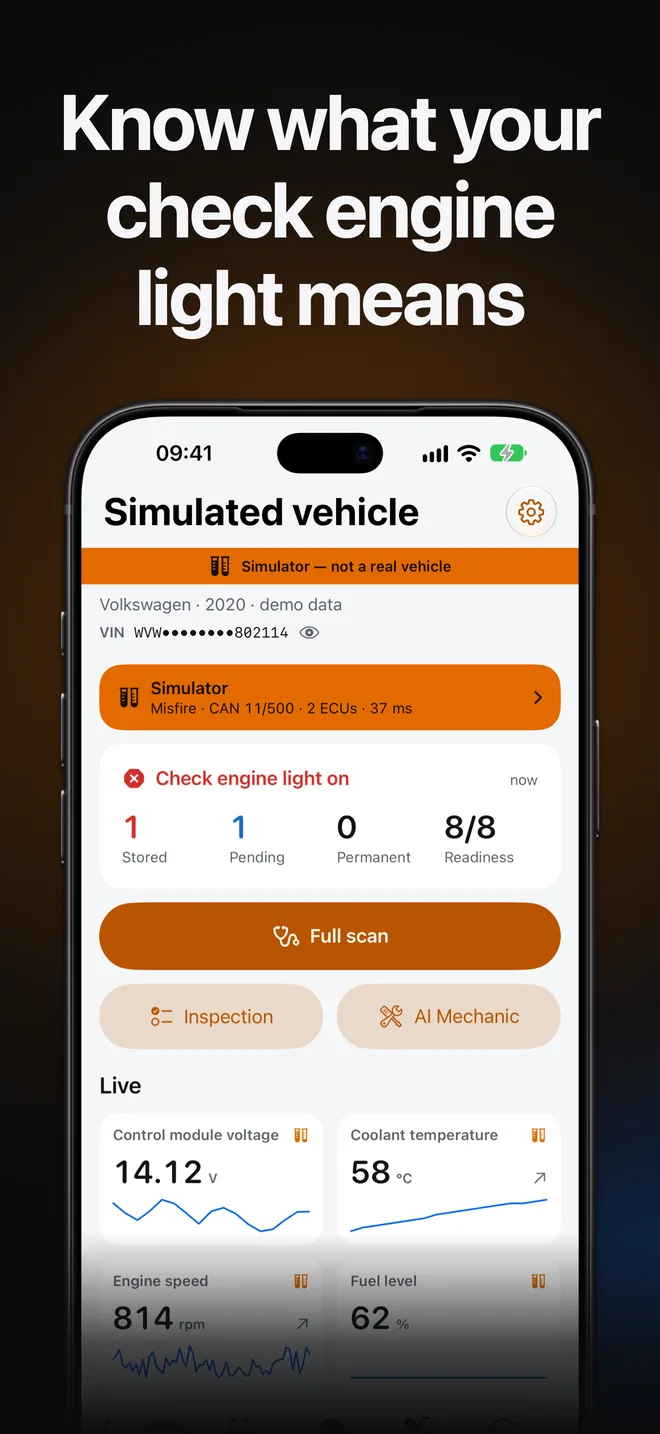
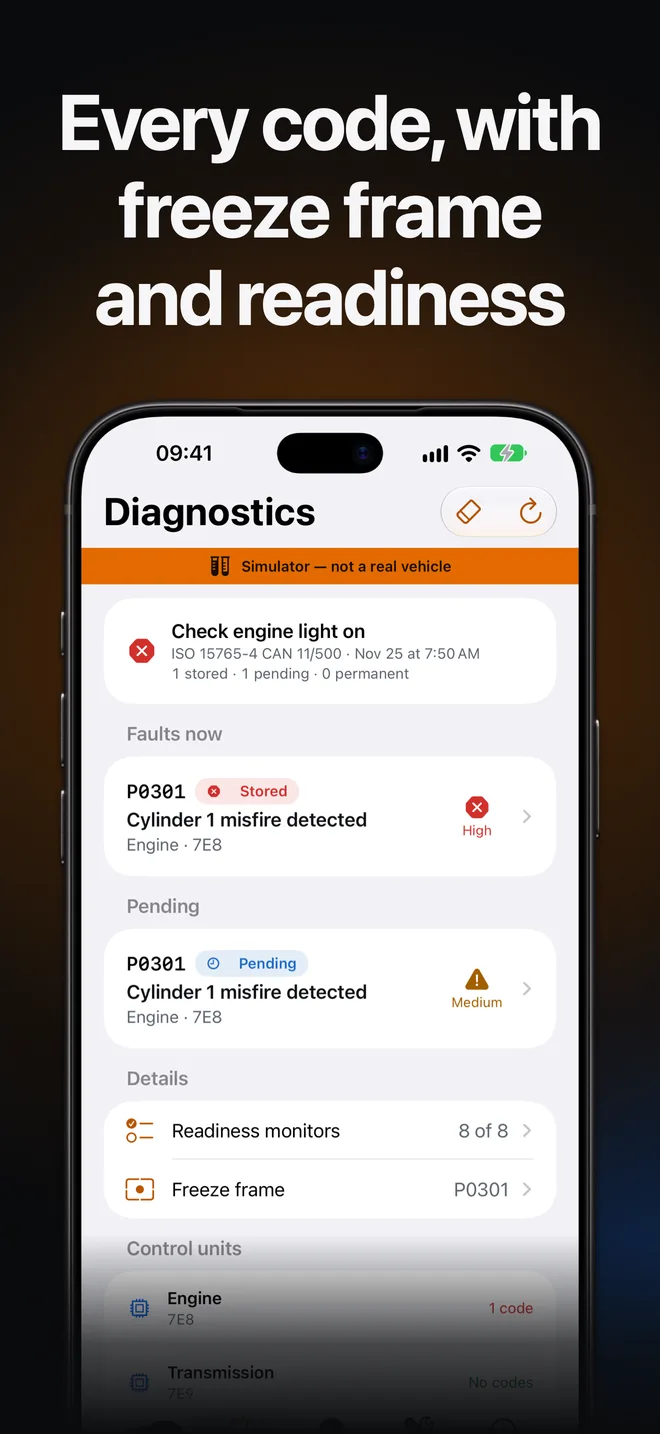
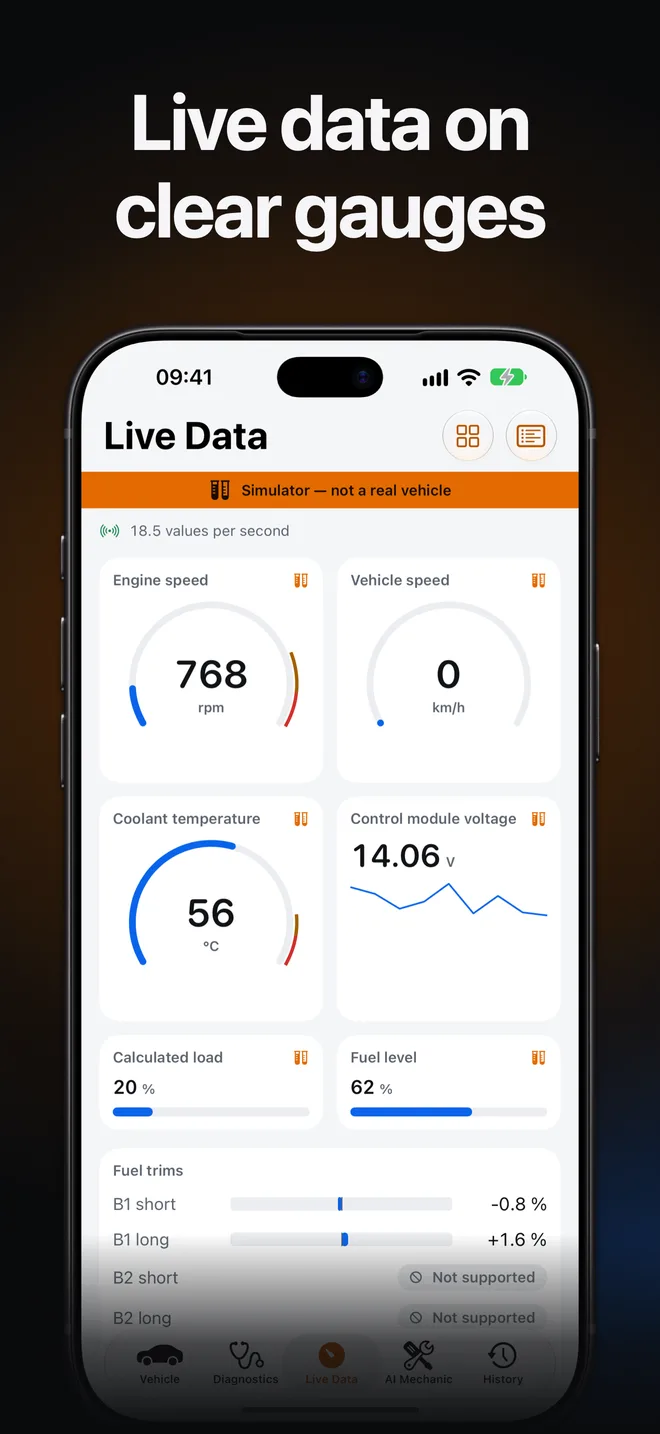
On the iPhone
Screens from the current version on the App Store.
How it works
Hoodsight, from first tap to finished.
Plug in an adapter
Plug an ELM327-compatible Bluetooth LE or Wi-Fi adapter into the OBD-II port under the dashboard. Hoodsight finds it and tests it with Adapter Doctor.
Read the codes
Stored, pending and permanent codes from every emissions-related control unit, with the freeze frame saved when each fault was set and the readiness monitors.
See the evidence
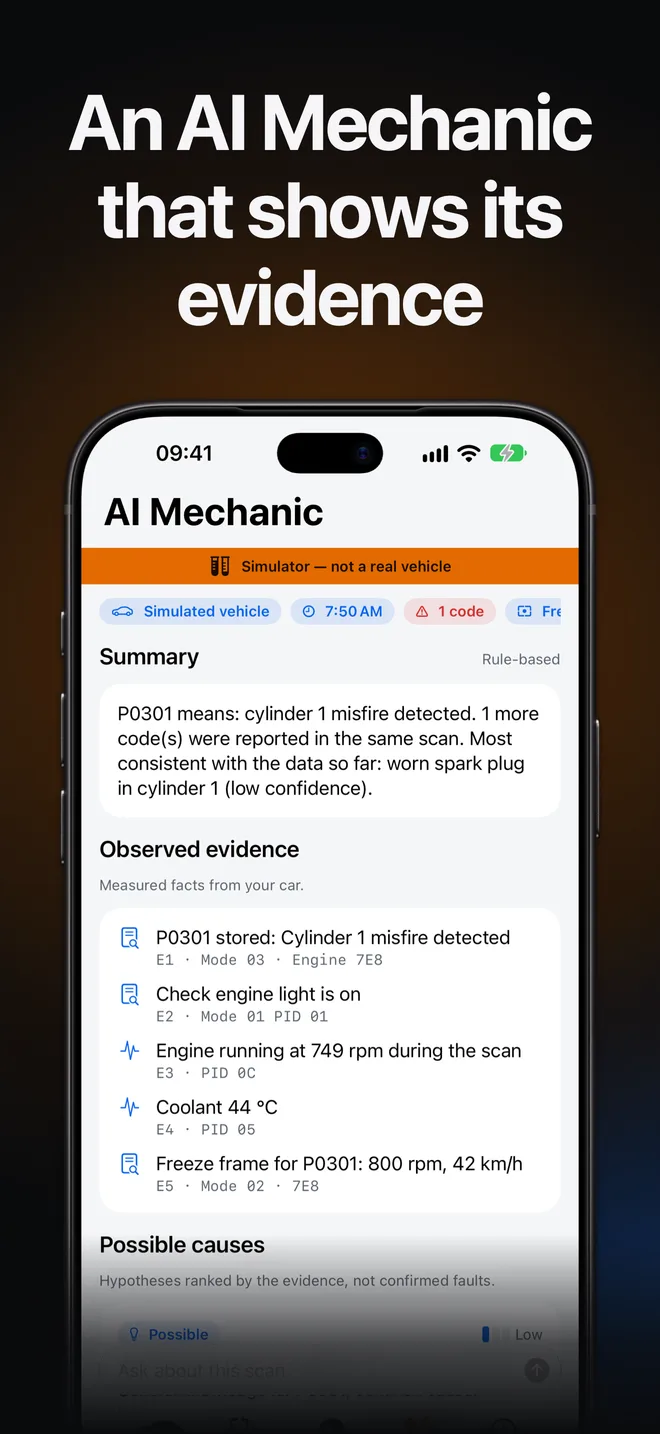
The AI Mechanic connects codes, freeze frame and live readings into likely causes, and each cause lists the evidence it rests on.
Clear safely, and keep the record
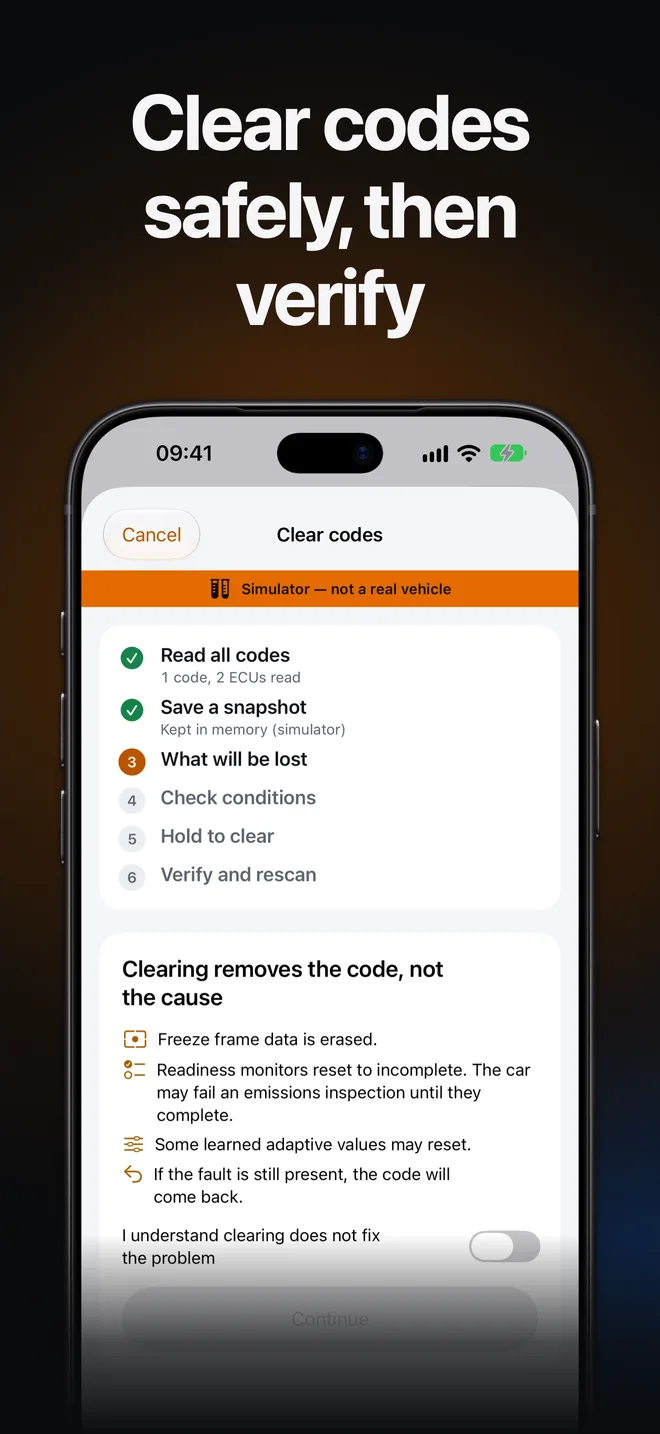
The safe clear refuses while the car is moving, then checks which codes came back. Every scan, clear and inspection is saved per vehicle, on your device.
What it does
- Works with ELM327-compatible Bluetooth LE and Wi-Fi OBD-II adapters, tested by Adapter Doctor
- Stored, pending and permanent codes from every emissions-related control unit, with freeze frame
- Readiness monitors and a safe clear that refuses while the car is moving
- Live gauges for RPM, coolant temperature, fuel trims, oxygen sensors and every supported parameter
- AI Mechanic: likely causes with the evidence behind each, and an on-device Apple Intelligence summary
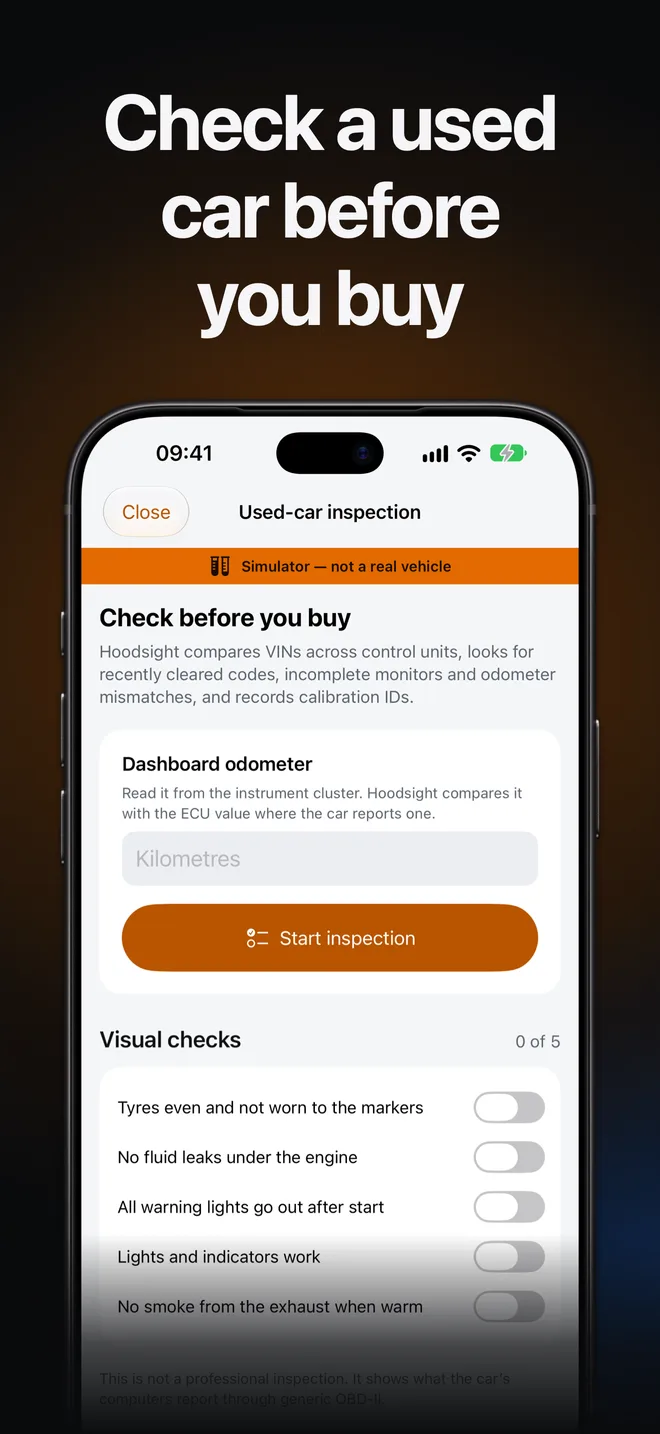
- Used-car inspection: VIN across control units, recently cleared codes, odometer and calibration IDs
- A labelled simulator with six scenarios to try every screen without a car
- No account, no ads, no tracking: scans and history stay on your device
- Hoodsight Pro: more dashboards, your own dashboard, unlimited clears and AI Mechanic questions
Connect
Plug a Bluetooth LE or Wi-Fi ELM327-compatible adapter into the OBD-II port under the dashboard. Hoodsight finds it and tests it with Adapter Doctor. Clone adapters that misbehave stay read-only. Classic Bluetooth adapters cannot work with iPhone or iPad.
Fault codes
- Stored, pending and permanent codes from every emissions-related control unit
- Freeze frame data saved at the moment a fault was set
- Readiness monitors, to see whether the car is ready for an emissions test
- A safe clear that refuses while the car is moving and then checks which codes came back
Live data
Gauge dashboards for the readings your car supports, such as RPM, coolant temperature, fuel trims and oxygen sensors, plus a browser for every supported parameter.
Ai mechanic
Rules built into Hoodsight connect codes, freeze frame and live readings into likely causes, and each cause lists the evidence it rests on. On devices with Apple Intelligence the summary is written on device. Nothing is uploaded.
Used-car inspection
Before you buy, Hoodsight compares the VIN across control units, looks for recently cleared codes and incomplete monitors, checks the odometer against the ECU where the car reports it, and records calibration IDs.
History
Every scan, clear and inspection is saved per vehicle, on your device.
Hoodsight pro
Scanning, readiness, freeze frame, inspection and history are never locked. Without Pro you get the Daily dashboard, one safe clear per day and three AI Mechanic questions per day. Hoodsight Pro adds the Fuel & air and Temperatures dashboards, your own dashboard with any parameter, unlimited safe clears and unlimited AI Mechanic follow-up questions, as a monthly or yearly subscription or a one-time Lifetime purchase.
Try it without a car
A labelled simulator with six scenarios, including a misfire, a lean mixture and recently cleared codes, shows every screen before you own an adapter.
What it reads
Generic OBD-II reaches the engine and emissions control units. ABS, airbag and body modules are shown as not accessible instead of guessed.
Use Hoodsight only with the car parked. Results show what the car's computers report and are not a professional inspection.
Who it is for
Drivers with a check engine light
Read the code yourself, see what it likely means and what it rests on, and decide whether it needs a garage today.
Used-car buyers
Compare the VIN across control units, spot recently cleared codes and incomplete monitors, and check the odometer against the ECU where the car reports it.
Home mechanics
Gauge dashboards for RPM, coolant temperature, fuel trims and oxygen sensors, plus a browser for every parameter your car supports.
Free in your browser
Try the idea first, no install needed.
Guides and resources
More on hoodsight.cihat.dev, the Hoodsight website.
Questions
Which adapter does Hoodsight need?
An ELM327-compatible OBD-II adapter that connects over Bluetooth LE or Wi-Fi. Classic Bluetooth (SPP) adapters cannot work with iPhone or iPad.
Can Hoodsight read ABS, airbag or body modules?
No. Generic OBD-II reaches the engine and emissions control units only. ABS, airbag and body modules are shown as not accessible instead of guessed.
Is anything uploaded?
No. The AI Mechanic is built from rules inside the app, and on devices with Apple Intelligence the summary is written on the device. Scans and history stay on your iPhone or iPad. There is no account, no ads and no tracking.
Can I try it without a car?
Yes. A labelled simulator with six scenarios, including a misfire, a lean mixture and recently cleared codes, shows every screen before you own an adapter.
What does Hoodsight Pro add?
Scanning, readiness, freeze frame, inspection and history are never locked. Without Pro you get the Daily dashboard, one safe clear per day and three AI Mechanic questions per day. Pro adds the Fuel & air and Temperatures dashboards, your own dashboard with any parameter, unlimited safe clears and unlimited AI Mechanic follow-up questions, as a monthly or yearly subscription or a one-time Lifetime purchase through the App Store.
Is a Hoodsight result a professional inspection?
No. Results show what the car's computers report. Use Hoodsight only with the car parked, and have a qualified mechanic check the car before a repair or a purchase.
Related apps
More from home, car and work.

Hoodsight on the App Store
Check engine codes, live data.
